For After Effects 2022+ · Mac & Windows

The only easing plugin that
tells you what it does.

The graph editor leaves you guessing numbers. Eazly shows you the curve and, right next to it, what it does to your motion – in plain words: “eases in gently · slows down softly”. Select, choose, apply. Done.

★★★★★ One-time purchase · no subscription· 2 devices per license· 30-day money-back guarantee
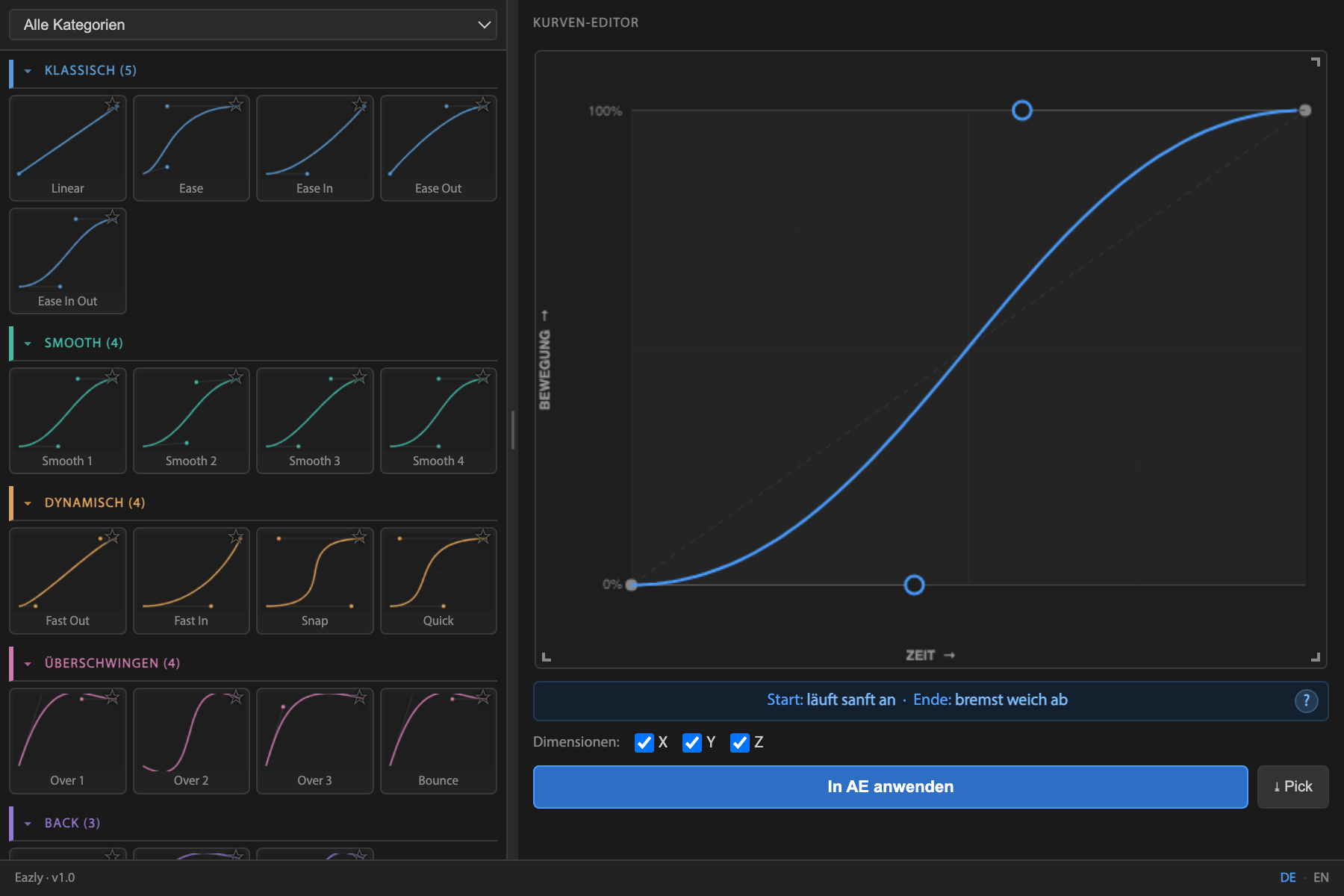
The Eazly panel in After Effects: the preset library on the left, the visual curve editor with its live explanation on the right.
Only in Eazly

Others show you a curve.
Eazly tells you what it does.

A bezier curve is abstract. What does it actually mean for your motion? Eazly translates every curve into plain language, live – so you make timing decisions with your eyes instead of guessing numbers.

Your curve
Eazly explains
  • Eases in gently
  • Speeds up through the middle
  • Slows down softly

No guesswork. You know exactly how the motion will feel – before you even hit play.

The problem – and the fix

Linear motion screams amateur.

Clean easing decides whether your work looks cheap or high-end – but the standard way in After Effects is fiddly. With Eazly it's three steps. See for yourself:

1

Select keyframes

Select two or more keyframes in the timeline.

2

Choose or shape a curve

Grab a preset or shape the bezier curve freely. Eazly shows you live how the motion will feel.

3

Apply – done

One click, and your animation instantly looks more premium.

The same animation – once linear, once with Eazly. The difference between “homemade” and “expensively produced”.

Seconds instead of minutes

Here's how simple it is.

1

Select

Select your keyframes in After Effects – that's the whole setup.

2

Choose

Click a preset or shape the curve yourself. The live explanation tells you what happens.

3

Apply

Hit “Apply in AE” – the easing lands on every keyframe instantly.

Features

Everything that makes good timing fast.

The Eazly panel: preset library and visual curve editor
One panel: the preset library on the left, the visual curve editor on the right. Everything visible – nothing hidden.
📝

Live plain-language explanation

Every curve in words – the only plugin that tells you what your easing actually does.

✏️

Visual curve editor

See the curve instead of guessing numbers – timing becomes a design decision.

📚

48 presets in 14 categories

Proven easings – from Smooth to Back to Anticipation. Premium results from second one.

🎯

Pick easing

Read easing that works from existing keyframes and reuse it anywhere.

🧭

X / Y / Z separately

Fine-tune per dimension – for motion that truly lands.

💾

Custom presets

Save your style, export it, share it, favorite it.

Why Eazly

The difference at a glance.

Graph editor & subscription tools
Eazly
Can you see what the curve does?
Numbers & lines only
Explained live, in plain words
Learning curve?
The graph editor has to be learned
Self-explanatory, ready in seconds
Ready-made presets
Few, or unsorted
48 in 14 categories
Reusing easing
Rebuild it by hand
“Pick” it with one click
Cost
Monthly subscription
€14 once, yours forever
Voices

What users say.

★★★★★
“I finally understand what my easing curve is actually doing. It saves me minutes on every single project.”
— First name L.Motion Designer
★★★★★
“Select, click, done. This is exactly how easing in After Effects should work.”
— First name L.Video Editor
★★★★★
“The live explanation is brilliant for anyone who never really got the graph editor.”
— First name L.Freelancer

Real quotes from the beta test will appear here at launch.

Pricing

Pay once. Use forever.

Eazly – full version
€19€14
Launch price – back to €19 soon.
Get it now
  • Signed installer package (.zxp)
  • Illustrated installation guide
  • License for up to 2 devices
  • Free updates – for life
  • 30-day money-back guarantee
One-time purchase · no subscription · support straight from the developer
FAQ

Frequently asked questions

Which After Effects versions are supported?

After Effects 2022 or newer, on Mac & Windows.

Subscription or one-time purchase?

One-time purchase – pay once, use forever. No subscription, no recurring cost.

On how many devices can I use Eazly?

On up to 2 devices with your personal license key – for example a desktop and a laptop.

Do I get updates?

Yes, all future updates are included free of charge.

How do I install Eazly?

You download the signed file (.zxp) and install it with a free ZXP installer. Then, in After Effects: Window → Extensions → Eazly. On first launch you enter your license key. An illustrated guide is included.

What if I don't like it?

30-day money-back guarantee – no questions asked. Just drop me a line.

Is there support?

Yes – direct support by email, personally from the developer.

Make your animations look expensive.

Professional easing in After Effects – one click, with a curve that explains itself.

Get Eazly – €14

One-time purchase · 30-day money back · no subscription