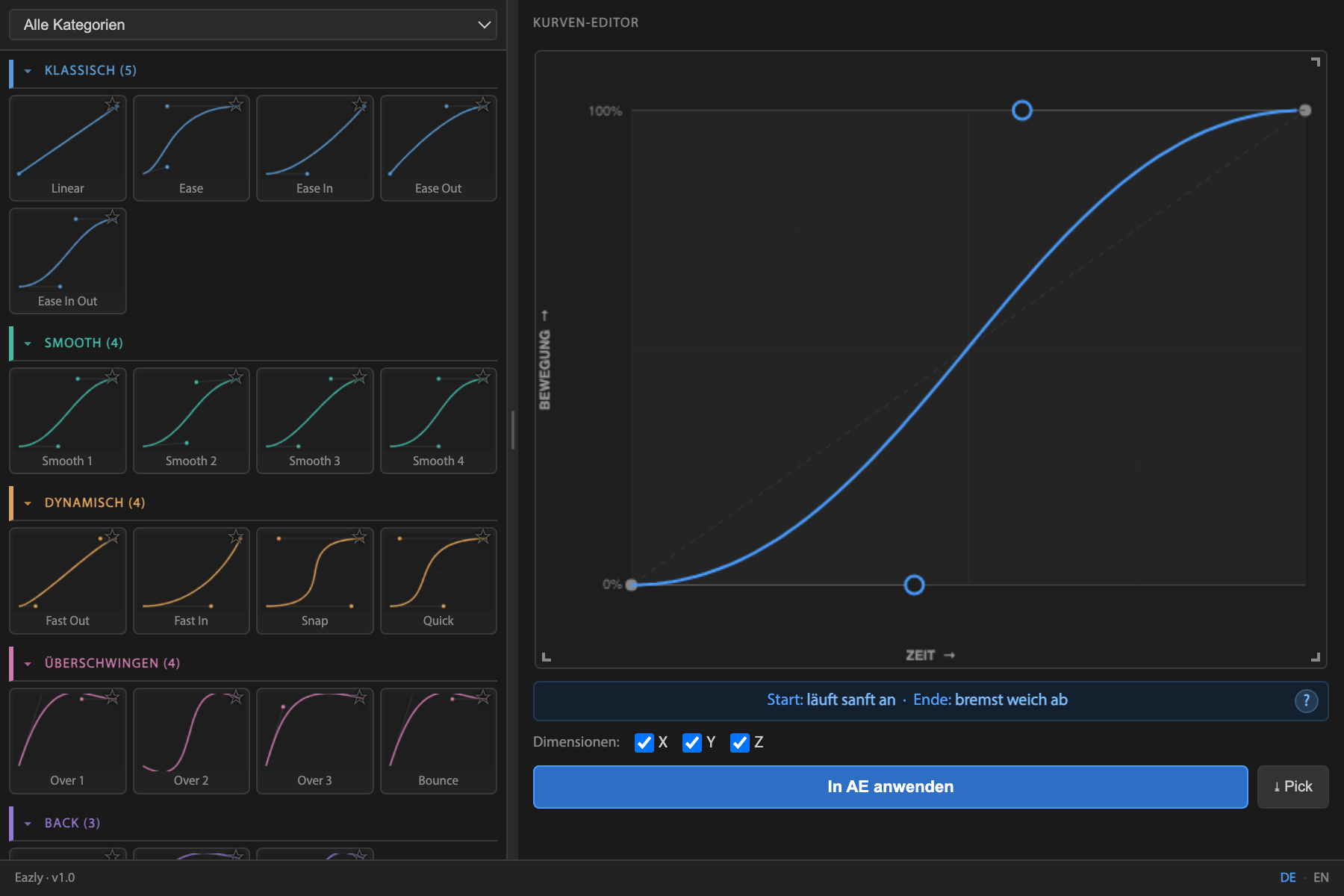
Premiere leaves you stranded on keyframes, and the graph editor in After Effects leaves you guessing numbers. Eazly shows you the curve and tells you in plain words what it does to your motion – “eases in gently · brakes softly”. One purchase, both apps.
Same distance, same duration. Only the timing differs – and that is exactly what decides whether it looks cheap or expensive.
This is not a video and not a screenshot – it is the real editor. Drag the handles and watch the description and the motion change with them. Switch to Speed to see where the motion is fast and where it is slow – something Premiere does not offer at all.
No guesswork. You know how the motion will feel – before you even play it.
The plugin adds what a browser cannot do: apply the curve to your real keyframes, pick easing off existing ones, save your own presets – and the speed view.
Clean easing decides whether your work looks cheap or high-end – but the standard way in After Effects is fiddly. With Eazly it's three steps. See for yourself:
Select two or more keyframes in the timeline.
Grab a preset or shape the bezier curve freely. Eazly shows you live how the motion will feel.
One click, and your animation instantly looks more premium.
The same animation – once linear, once with Eazly. The difference between “homemade” and “expensively produced”.
Every curve in words – the only plugin that tells you what your easing actually does.
See the curve instead of guessing numbers – timing becomes a design decision.
Proven easings – from Smooth to Back to Anticipation. Premium results from second one.
Read easing that works from existing keyframes and reuse it anywhere.
Fine-tune per dimension – for motion that truly lands.
Save your style, export it, share it, favorite it.
“I finally understand what my easing curve is actually doing. It saves me minutes on every single project.”
“Being able to do this right inside Premiere, instead of jumping to After Effects for every move – that alone is worth the money.”
“The live explanation is brilliant for anyone who never really got the graph editor.”
Placeholders – real quotes from the beta test will appear here at launch.
I am a videographer and I cut in Premiere myself. Easing was the point where it always got annoying: either you fight the built-in controls, or you get told to just do it in After Effects. For an edit with a handful of moves, that is absurd.
So I built the tool I wanted for myself: a curve you can grab, and next to it, in plain words, what it does. For both apps, because I work in both.
— Sven, developer of Eazly
Customer quotes will appear here as soon as the first feedback comes in – no invented testimonials from me.
Yes – both are included, with a single license key. You pay once and use Eazly in both apps.
After Effects 2022 or newer and Premiere Pro 2024 or newer, each on Mac & Windows.
Premiere can “ease in/out” keyframes and offers a fiddly speed graph, but no real easing editor. That is why the usual advice in forums is “do it in After Effects”. Eazly brings the full curve editor, including the speed view, straight into Premiere.
One-time purchase – pay once, use forever. No subscription, no recurring cost.
On up to 2 devices with your personal license key – for example a desktop and a laptop.
Yes, all future updates are included free of charge.
For After Effects you download the signed file (.zxp) and install it with a free ZXP installer; you will then find the panel under Window → Extensions → Eazly. Premiere Pro comes with its own installer package. On first launch you enter your license key. An illustrated guide for both apps is included.
30-day money-back guarantee – no questions asked. Just drop me a line.
Yes – direct support by email, personally from the developer, in English or German.
Professional easing in Premiere Pro and After Effects – one click, with a curve that explains itself.
Get Eazly – €14.99One-time purchase · 30-day money back · no subscription